AI & MCP overview
How AI assistants build and edit your site through the built-in MCP server.
On this page
Uncoder has a built-in MCP server. It lets an AI assistant such as Claude, ChatGPT or Cursor work on your site: build pages, change your Design System, create a header, fix accessibility problems. The AI uses the same widgets and settings you use in the editor, so everything it makes stays editable by hand.
What MCP is
MCP stands for Model Context Protocol (opens in a new tab). It is an open standard that AI apps use to connect to other software. In plain words: when you connect your site, the AI app gets a set of tools for your site ("list the pages", "create a page", "update the Design System") and can use them while it talks to you.
You do not need an AI API key in WordPress for this. The AI app does the thinking with your own Claude, ChatGPT or Cursor account, and your site does the work.
What an AI assistant can do with Uncoder
Once connected, you can ask for things like:
- "Design a home page for a family-run bakery in Leeds, with a hero, three product highlights, opening hours and a contact form."
- "Change the brand colors to deep green and terracotta, and use Fraunces for headings."
- "Build a sticky header with the logo, the main menu and a Book now button, and show it on the whole site."
- "Check the About page for accessibility and SEO problems and fix them."
The AI can read and change pages, posts, templates, popups, menus, media and site settings, within the permissions you give it. See What AI can do for the full picture and more example prompts.
Connect an AI app
Go to Uncoder → AI & MCP. The Connect a client tab has copy-ready instructions for each app. Click Create connection link and Uncoder fills the link into a one-click button or a snippet for that app.
There are three ways an app can connect:
| Method | Used by | What you need |
|---|---|---|
| Connection link (the default) | Every app: Claude, ChatGPT, Cursor, VS Code, Windsurf, Gemini CLI and any MCP client | One link per app, created under Connect a client. You paste it once, with no keys, headers or sign-in to set up. HTTPS on a public site; apps on your own computer also work with a local site. |
| Sign in with OAuth | The Claude app, Claude Code, ChatGPT and other apps that support it | Your site must be public and use HTTPS. You log in to your site once and approve the app. No key in an address. |
| API key in a header | Scripts and apps that send their own headers | An API key created in AI & MCP → API keys, with the permissions and expiry you choose. |
Apps that connect from the AI company's servers, such as the Claude app and ChatGPT on the web, need a public HTTPS site whichever method you use.
Read the status panel
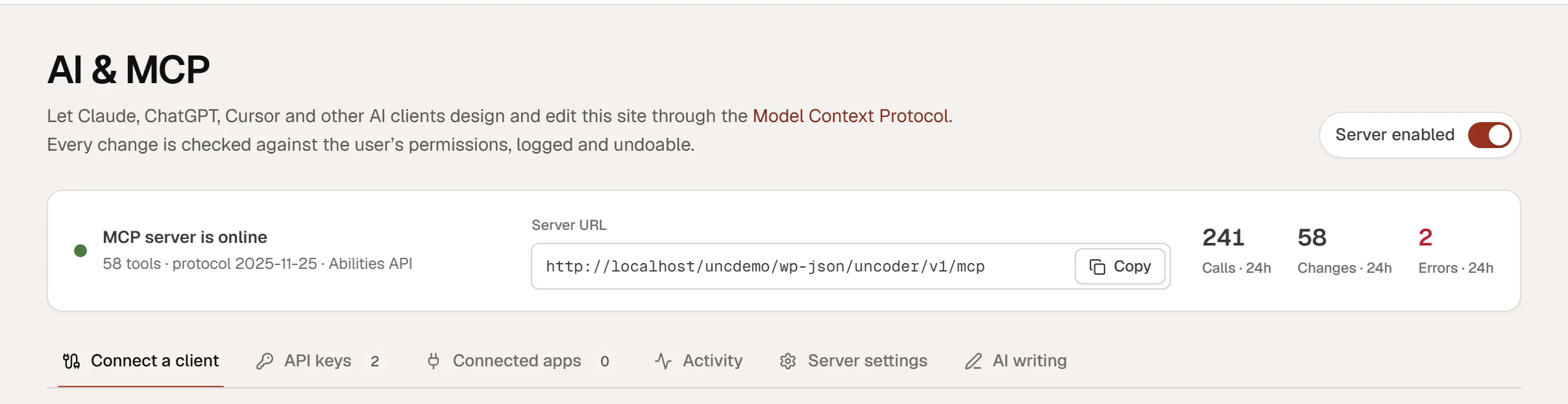
The top of the AI & MCP screen shows whether the server is running:
- Server enabled turns the whole MCP server on or off. When you turn it off, every AI client is disconnected until you turn it back on. API keys and connected apps are kept.
- MCP server is online confirms the server answers, with the number of tools it offers.
- Server URL is the address you give to AI apps. Click Copy to copy it. It looks like
https://example.com/wp-json/uncoder/v1/mcp. - Calls · 24h, Changes · 24h and Errors · 24h count what AI clients did in the last 24 hours.
How your site stays safe
- The AI acts as you. Every request runs as the WordPress user who connected the app, and it can only do what that user may do.
- You choose the permissions. A connection gets only the permissions you allow: read, content, design and site. See API keys & scopes.
- Every change is logged. The Activity tab lists each call with the app, the tool and the result.
- Changes can be undone. Before an AI changes a page, a template, a popup or the Design System, Uncoder saves the previous state. You can undo the change from the activity log, or from the editor if the page is open.
- Deleting needs a confirmation. An AI can only move a page to the trash after an explicit confirmation step, so it has to ask you first.
Read Security & privacy for the details.
If you have a page open in the editor while an AI changes it, the editor loads the new version and shows Updated by with the app's name and an Undo button. If you have unsaved changes, it asks before loading the AI's version.
AI writing in the editor is separate
Uncoder also has AI buttons inside the editor: rewrite a text, translate it, write alt text or generate an image. Those use your own API keys and are set up in the AI writing tab. See AI writing and AI images.