Security & privacy
How AI connections are secured, what an AI can access, how changes are confirmed and undone, and where your data goes.
On this page
Connecting an AI app to your site is like giving a capable assistant a login. Uncoder keeps that login narrow: the AI acts as a real WordPress user, gets only the permissions you allow, and every change is logged and can be undone. This page explains each safeguard and what data goes where.
The AI acts as a WordPress user
Every request runs as the WordPress user who created the API key or approved the app. Uncoder checks that user's capabilities for each action, exactly like in the editor:
- An Editor's connection can change pages, but not the Design System or site settings.
- A user who cannot publish cannot publish through AI either.
- If Uncoder's role setting in Settings → Access & roles gives a role Content only, AI can only read for that role. With No access, it cannot connect at all. See Roles & access.
Only roles ticked under Allowed roles in Server settings may connect AI apps. By default that is administrators only.
Permissions (scopes)
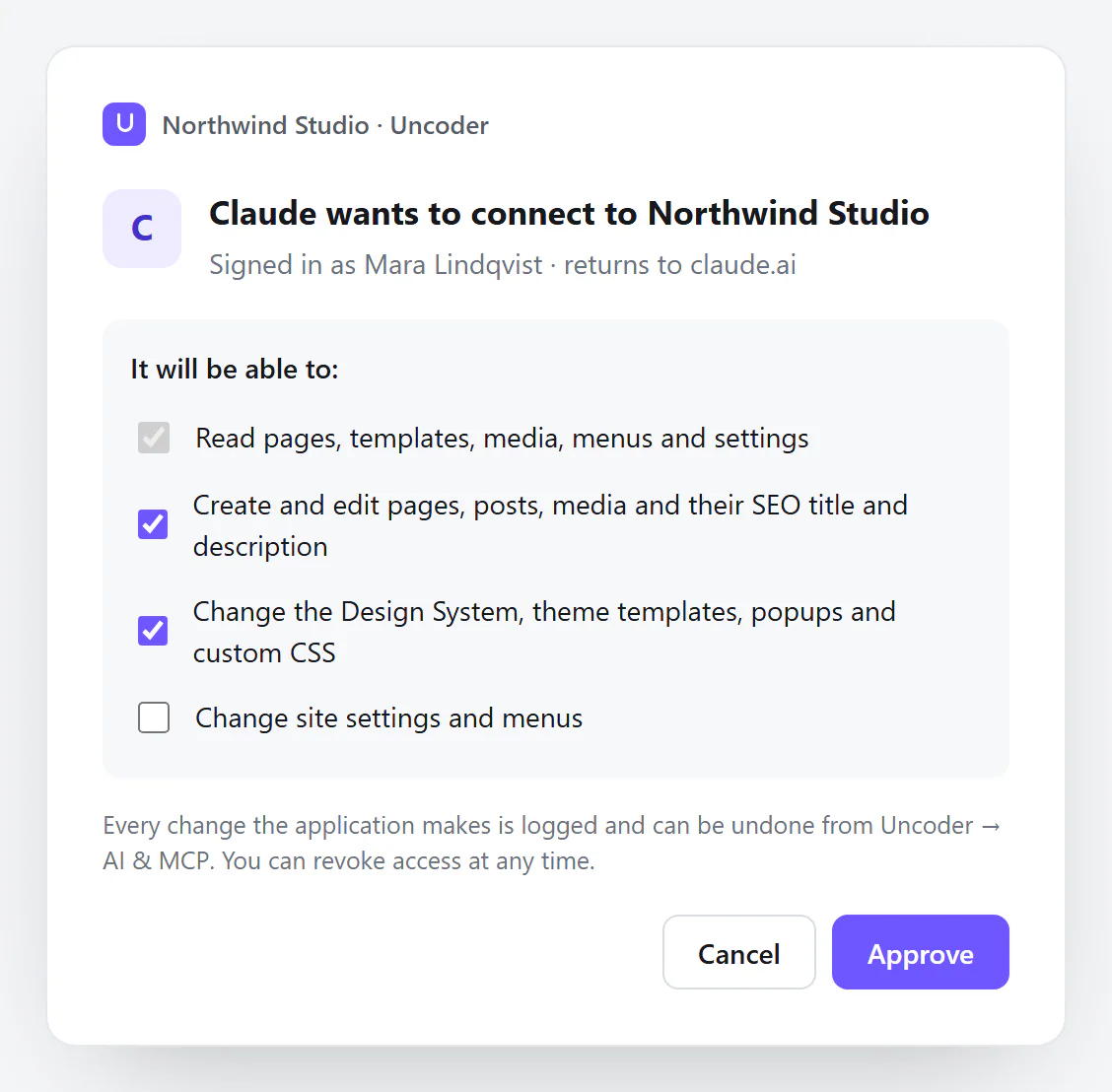
On top of the user's own rights, each connection has up to four permissions: Read, Content, Design and Site. Read is always included. Site, which covers site settings, menus, caches and form submissions, is off unless you tick it. See What each permission allows.
A connection never gets more than its user may do, whatever permissions it asks for.
How connections sign in
Apps that sign in (OAuth), such as the Claude app and ChatGPT:
- You approve each app on your own site, logged in to WordPress, and choose its permissions.
- The app gets short-lived access (one hour) that it renews automatically. Unused access runs out after 30 days.
- Each renewal replaces the previous token. If an old token is used again, which suggests it was copied, Uncoder disconnects that app for that user.
- Apps can only register themselves while Dynamic client registration is on. Turn it off to freeze the list of apps.
- You can disconnect any app under Connected apps.
API keys:
- A key is shown once. Uncoder stores only a scrambled fingerprint (a hash) of it, so nobody can read keys from the database.
- Keys can expire after 30, 90 or 180 days or a year, and you can revoke them at any time. See API keys & scopes.
- Keys are sent in a request header. Only connection links, keys made for one address, are accepted in a URL (
?token=), and only over HTTPS; Uncoder strips them from the request before other code runs. Treat a link like a password, because web server access logs can still record addresses.
Clients can also sign in with a WordPress application password of an allowed user. An application password carries all four permissions, so prefer an API key with only the permissions the app needs.
Use HTTPS. Connectors like the Claude app and ChatGPT require it, and keys should never travel over plain http on the internet. The optional @uncoder/mcp bridge refuses to send a key over http except to local addresses.
Limits on what an AI can do
- Rate limit. Each key or app may make 120 tool calls per minute by default. See Server settings.
- Web pages on other sites cannot call your server unless you add their address under Allowed origins. Desktop apps, terminal apps and connectors are not affected.
- Deleting needs a confirmation. With Confirm destructive actions on (the default), an AI can only move a page, post or template to the trash after an explicit confirmation, so it has to ask you. Trashed items can be restored from WordPress.
- Uncoder's tools stay inside what Uncoder manages. An AI cannot install plugins or themes, manage users, delete media files, change Uncoder's settings screens or read API keys and passwords. See What AI can do.
- ChatGPT also asks you to confirm each change before it runs.
Every change is logged and can be undone
- The activity log lists every request: which app, which user, which tool, the result and a short summary. The full content an AI sends is never stored. Entries are kept for 30 days by default.
- Before an AI changes a page, a template, a popup or the Design System, Uncoder saves the previous state. Undo it from the activity log, ask the AI to undo it, or use Undo in the editor if the page is open.
- The last 15 saved versions are kept per page.
Turn everything off at once
If something looks wrong, turn off Server enabled at the top of Uncoder → AI & MCP. Every AI app is disconnected immediately. Keys and connected apps are kept, so you can turn the server back on after you have checked the activity log. To cut off one app for good, revoke its key or disconnect it.
What data goes where
| Feature | What leaves your site | Where it goes |
|---|---|---|
| AI apps over MCP | Whatever the app asks for with its permissions: page content, settings, media details, and form submissions if it has Site. | To the AI app, which sends it to its AI provider (for example Anthropic for Claude, OpenAI for ChatGPT) as part of your conversation. That provider's terms apply. |
| Image search | The search words. | From your server to Openverse (opens in a new tab). Imported images are downloaded to your media library. Turn it off under Server settings → Image search. |
| Images from a web address | Nothing: your server downloads the image the AI points to. | Into your media library. |
| AI writing | The text of the field you work on, or the image you chose for alt text, only when you click an AI action. | From your server to Anthropic, with your key. See AI writing. |
| AI images | The description you type, when you click Generate. | From your server to the image service in the settings, with your key. See AI images. |
Uncoder does not send your content, keys or activity to its makers. API keys for AI writing and AI images stay on your server and are never included in exports or site kits.
When you remove Uncoder
If you turn on Remove all data on uninstall in Advanced settings and then delete the plugin, the API keys, connected apps, OAuth registrations and the activity log are deleted too. Without that setting they stay in the database, unused.