AI writing
Set up AI writing in the editor with your own Anthropic API key: improve, shorten, translate and write alt text.
On this page
AI writing adds a small AI button to text fields in the editor. With it, you and your editors can improve a text, make it shorter or longer, fix spelling, change the tone, translate it, and write alt text for images. It uses your own Anthropic (Claude) API key, so you pay Anthropic directly for what you use.
This is separate from connecting an AI assistant over MCP, which needs no key in WordPress. See AI & MCP overview.
Set it up
You need an Anthropic API key. Create one in the Anthropic Console (opens in a new tab) under API keys, and make sure your account has credit.
Open the AI writing tab
Go to Uncoder → AI & MCP → AI writing.
Turn on AI actions
In the AI writing in the editor card, turn on AI actions in the editor.
Paste your key
Paste the key into Anthropic API key.
Choose a model
Pick a Model:
- Claude Sonnet 5 (balanced, recommended)
- Claude Haiku 4.5 (fastest, lowest cost)
- Claude Opus 5.5 (most capable)
Save
Click Save changes in the bar at the bottom of the screen.
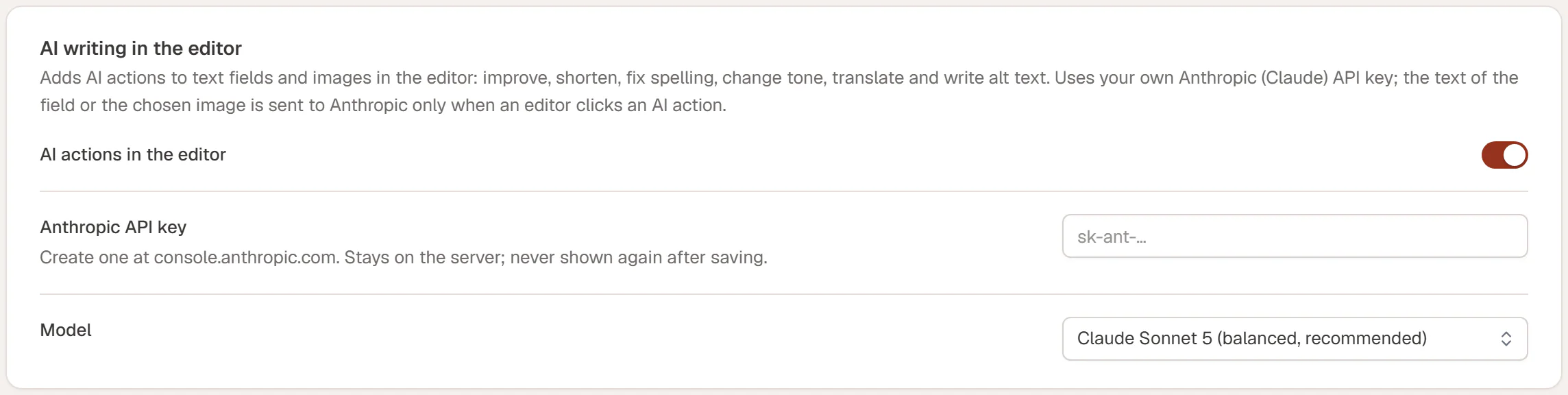
The key stays on your server. It is never shown again after saving, never sent to the editor, and never included in exports or site kits. Once a key is saved, the field says A key is saved. Leave empty to keep it. To replace it, paste a new one and save.
To switch AI writing off, turn off AI actions in the editor and save. The AI buttons disappear from the editor.
Use AI writing in the editor
In the editor, select an element and look at its Content tab. Text fields get a small sparkle button next to their label. Click it to open the AI writing menu:

| Action | What it does |
|---|---|
| Improve writing | Makes the text clearer and more engaging, at about the same length and with the same meaning. |
| Make shorter | Cuts the text to about half, keeping the key message. |
| Make longer | Expands on what the text already says, without inventing facts, prices or claims. |
| Fix spelling & grammar | Corrects spelling, grammar and punctuation only. |
| Tone | Rewrites the text as professional, friendly, confident, simple or persuasive. |
| Translate to… | Type a language, such as Spanish, and press Enter. Names, brands and links stay as they are. |
| Or tell it what to change… | Type your own instruction, such as "mention free parking", and press Enter. |
The result replaces the field's text right away. If you do not like it, press Ctrl+Z (⌘+Z on a Mac) to undo.
Fields for technical values, such as links, IDs, CSS classes and code, have no AI button.
Write alt text for images
Image fields get a Write alt text with AI button. Uncoder sends the chosen image to Anthropic and saves the answer as the image's alt text in the media library, so every place that uses the image gets it. The alt text is written in your site's language. If the image looks purely decorative, the alt text stays empty.
This works for JPEG, PNG, GIF and WebP images from the media library, up to 4 MB.
See AI in the editor for more on working with the AI buttons.
Who can use it
Everyone who can edit with Uncoder sees the AI buttons once AI writing is set up, unless their role has No access in Roles & access. Writing alt text also needs permission to upload files. Only administrators can change the settings on the AI writing tab.
Limits and privacy
- What is sent: only the text of the field you work on, or the one image you chose, and only when someone clicks an AI action. Nothing is sent in the background.
- Where it goes: directly from your server to Anthropic, with your key. Anthropic's terms for API use apply.
- Length: up to 12,000 characters per request.
- Rate: each user can make 40 AI writing requests in 10 minutes. After that, the editor asks to wait a few minutes.
If a request fails, the editor shows why. "The AI service rejected the API key" means the key is wrong or was revoked: create a new one in the Anthropic Console and paste it. "The AI service returned an error" often means the account has no credit left. "The AI service is busy" goes away if you try again a moment later.